WP HoloDev is built around a bring-your-own-model approach. You choose the AI providers and models you want to use, connect your own credentials and remain in control of which models power your development work.
Use cloud providers, OpenCode services, local models through LM Studio and compatible custom endpoints. Choose different models for different jobs, balance capability against cost and change your setup as better models become available.
WP HoloDev provides the development harness. You decide which AI runs inside it.
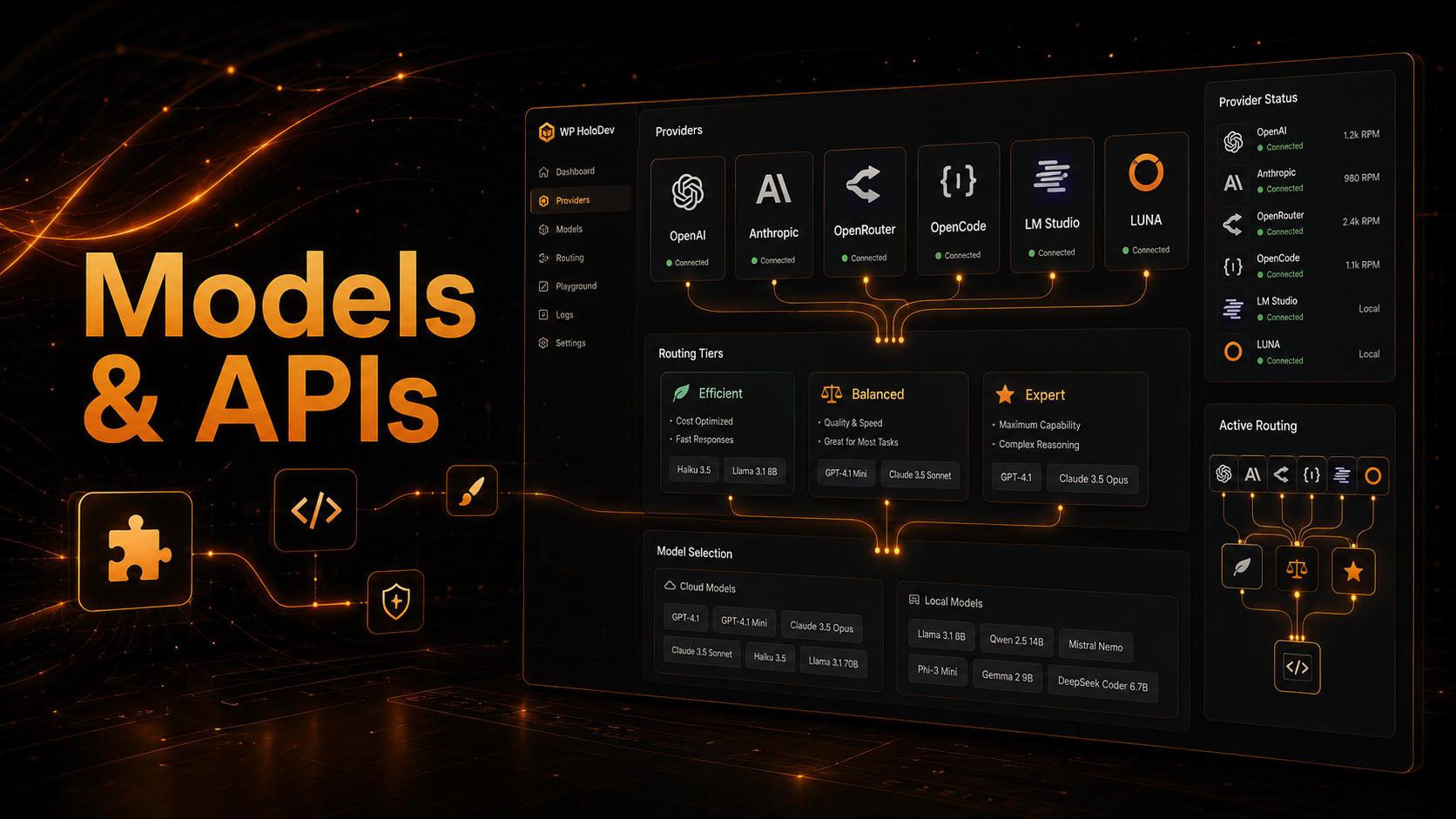
Your Models, Your Providers, Your Choice
WP HoloDev does not lock your development workflow to one AI company or force every task through the same model.
Bring Your Own API
Connect supported providers using your own credentials and use the API access you already have. WP HoloDev does not resell model access or require a separate model subscription just to use the harness.
Your projects, development tools, skills, memory, permissions, validation and release workflows remain inside WP HoloDev while you choose the AI services that provide the underlying intelligence.
Connect the Providers You Want
WP HoloDev supports several routes to cloud and local AI models, giving you flexibility over capability, cost and where the model runs.
OpenAI
Connect OpenAI directly using your own API credentials and make compatible models available for coding, reasoning, debugging, review and other development work.
Anthropic
Connect supported Anthropic models through the same WP HoloDev project and development environment.
This gives you another option for demanding coding and reasoning tasks without changing the harness around the model.
OpenRouter
OpenRouter gives you access to a large range of models from different developers through one API connection.
This makes it easy to compare models, experiment with different capability and price levels and switch models without rebuilding your WP HoloDev workflow.
OpenCode Zen and OpenCode Go
WP HoloDev supports OpenCode services as additional routes to coding and reasoning models.
OpenCode connections sit alongside your other providers, so the same project can use different model sources without changing its tools, memory or development history.
Compatible Custom Endpoints
WP HoloDev can also work with supported custom API endpoints, allowing additional compatible services to become part of your model setup.
This helps keep the harness adaptable as new model providers and inference services appear.
Run AI Models Locally with LM Studio
You do not have to send every development task to a cloud API.
Use Models Running on Your Own Computer
WP HoloDev can connect to LM Studio and use compatible local models through the same project and agent workflow as cloud models.
Your development tools, skills, memory, validation and project context stay in place. Only the model backend changes.
This gives you the option to combine local and cloud AI according to privacy, hardware, cost and capability requirements.
Discover Models From Your Providers
AI model catalogues change quickly, so WP HoloDev does not need to rely entirely on a fixed list built into the application.
Use the Models Your Connection Actually Provides
Where a provider supports model discovery, WP HoloDev can retrieve the models currently available through that connection.
This makes it easier to use newly released models without waiting for the entire harness to be redesigned around them.
Where available, provider metadata such as context limits and pricing can also help inform model selection and usage tracking.
Different Models for Different Development Jobs
The strongest model is not automatically the best model for every task.
Efficient Models for Routine Work
Small code changes, straightforward investigations, simple fixes and routine development can often be handled effectively by faster and less expensive models.
Using an efficient model where it is sufficient can reduce cost and improve response time without forcing difficult tasks onto the same model.
Stronger Models for Difficult Work
Architecture, complex debugging, security-sensitive development, large-codebase reasoning and release review can benefit from stronger models.
WP HoloDev allows those models to be reserved for the stages where their additional capability is genuinely useful.
Efficient, Balanced and Expert Routing
Models can be organised into capability tiers so WP HoloDev can match the model to the work being performed.
Efficient
For fast, lower-cost work where deep reasoning is not required.
Balanced
For general implementation, debugging and everyday development where stronger reasoning is useful.
Expert
For complex architecture, difficult investigation, security review and other work where maximum capability is worth the additional cost.
Escalate When the Task Gets Harder
A task that starts simply can become more difficult once the agent begins investigating the real project.
Move to a Stronger Model When Needed
If complexity increases, confidence falls or repeated validation failures show that the current model is struggling, WP HoloDev can move the work to a stronger model instead of repeatedly using the same approach.
This makes model selection part of the development workflow rather than something you have to constantly manage by hand.
Take Direct Control Whenever You Want
Automatic routing is there to help, not to remove your choice.
Choose a Model Yourself
Use /models to browse the models available through your connected providers and select a particular model when you want direct control.
Use /model to change routing between modes such as auto, efficient, balanced and expert.
This is useful when you already know which model performs best on a particular project or type of development work.
Track Usage and Keep Costs Under Control
Bring-your-own-model means you can make deliberate decisions about where your AI development budget is being used.
Track Model Usage
WP HoloDev can associate token usage and estimated cost with development jobs and agents, helping you see which tasks are consuming model resources.
Use Budgets and Limits
Development budgets can help stop a difficult task, retry loop or multi-agent workflow from consuming more resources than intended.
This lets you combine powerful models with practical limits rather than treating API usage as unlimited.
Your Provider Credentials Stay Separate From the Agent
Connecting an external AI provider does not mean giving its API key to the coding model.
Protected Credential Storage
WP HoloDev keeps supported provider credentials separate from project source, normal chat content and project memory.
The model does not need to see your API key simply because the harness is using that provider.
Provider credentials are protected locally through WP HoloDev's credential-storage system.
Change the AI Without Changing the Harness
The model is only one component of the development system.
Your Workflow Stays Consistent
Project context, repository tools, development skills, subagents, memory, permissions, browser testing, validation, MCP integrations, release packaging and deployment belong to WP HoloDev rather than to an individual AI provider.
Switching from one model or provider to another does not mean rebuilding the rest of the development environment.
The model can change while the harness around it stays consistent.
Use the Models That Make Sense Today
AI development is changing quickly. The model you prefer now may be replaced by something faster, cheaper or more capable in the future.
WP HoloDev is designed so your development environment can outlast individual models and providers.
Connect the providers you want. Run models locally or in the cloud. Route work according to capability and cost. Switch when something better becomes available.
WP HoloDev stays the development harness around them.